Clone your Voice in under 5 minutes
Qwen3-TTS launched a few weeks ago and was integrated into MLX Audio shortly after. This gave me the idea to clone my voice and use it as the "Speak Text" feature for my posts.
Qwen3-TTS is officially live. We've open-sourced the full family—VoiceDesign, CustomVoice, and Base—bringing high quality to the open community.
— Qwen (@Alibaba_Qwen) January 22, 2026
- 5 models (0.6B & 1.8B)
- Free-form voice design & cloning
- Support for 10 languages
- SOTA 12Hz tokenizer for high compression
-… pic.twitter.com/BSWpaYoZWj
Voice cloning with Qwen3-TTS needs just two things: a short audio clip of the target voice (30-180 seconds) and an accurate transcript of what was said. The 1.7B parameter model learns the voice characteristics from that reference and applies them to any new text you give it.
uv run python src/tts_record.py my-script.txt \
  --engine qwen3-clone \
  --ref-audio my_voice.wav \
  --ref-text "The exact words I said in the recording"
That is it. Out comes a WAV file that sounds like you reading the text in my-script.txt. The first time I played back a cloned version of myself reading a blog post I had never recorded, it was genuinely unsettling—in some ways it felt familiar and yet not like my voice.
The quality of the clone depends heavily on the reference audio. Random recordings do not work well. I tried. It was crap. I think the model needs to hear you produce a wide range of English sounds to generalise your voice properly. According to standard phoneme inventories, General American English has roughly 24 consonant phonemes and 15-20 vowel phonemes including diphthongs—that is a lot of distinct sounds to cover in under three minutes.
I asked Claude to generate phoneme-rich scripts: natural-sounding sentences specifically designed to cover every English sound without sounding like a tongue twister. Four versions, from 90 seconds to 180 seconds:
# Excerpt from the 180-second script:
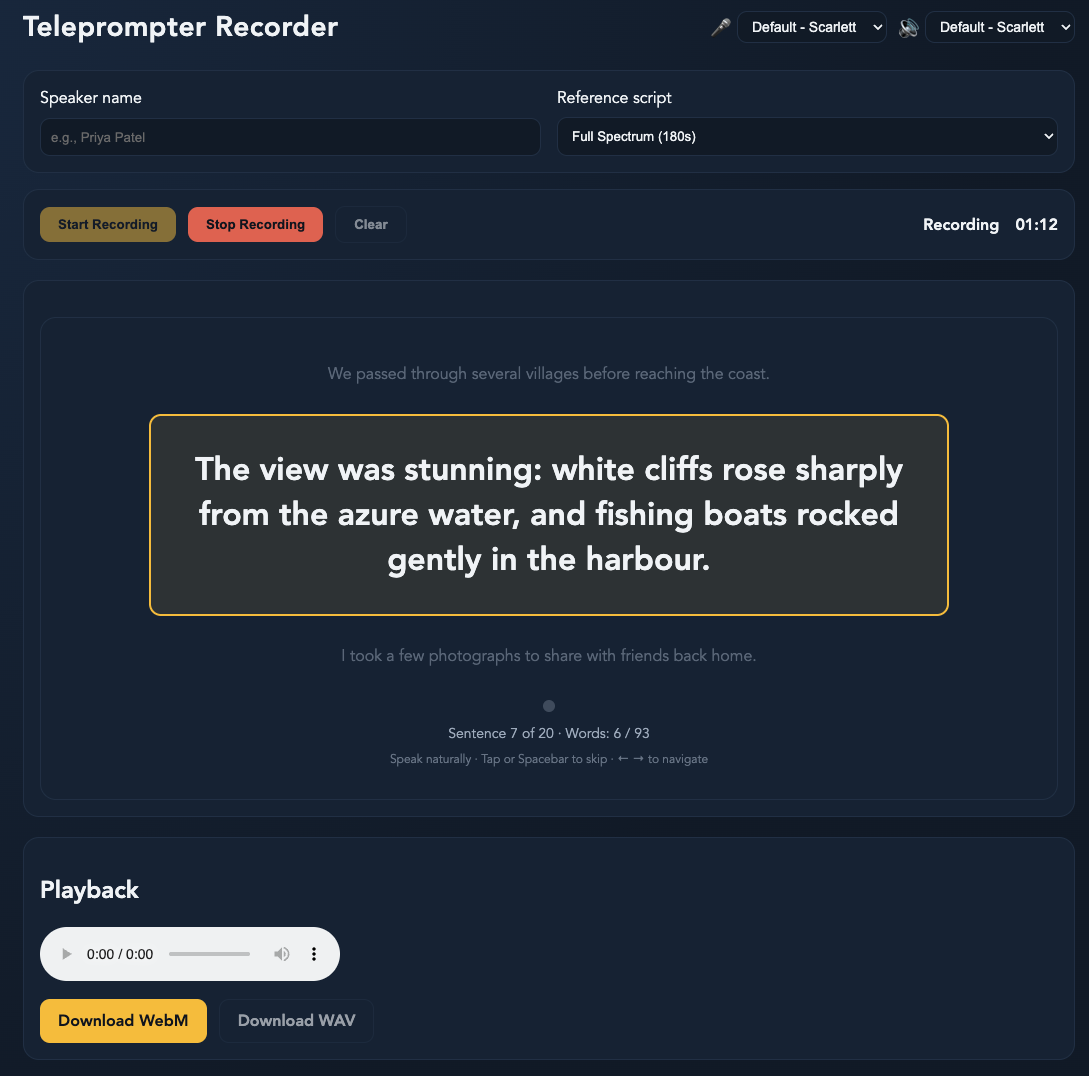
We passed through several villages before reaching the coast.
The view was stunning: white cliffs rose sharply from the azure water,
and fishing boats rocked gently in the harbour. I took a few photographs
to share with friends back home.
The next issue was that reading 90-180 seconds of text while recording was surprisingly awkward. I lost my place, rushed through sentences, or forgot to speak naturally. So I built a browser-based teleprompter. It is a single HTML file that captures audio and auto-advances when you have finished a sentence. Record, read, done. The whole process—from opening the teleprompter to having a usable voice clone—takes under five minutes.
What surprised me:
- How little audio you need. 90 seconds of well-chosen text produces surprisingly good clones. The phoneme coverage matters more than duration.
- Transcript accuracy is critical. If the transcript does not match the audio exactly, the clone quality drops noticeably. The model aligns phonemes between text and audio.
- Local inference on Apple Silicon is viable. The 1.7B model runs comfortably on M-series Macs via MLX.
0.6B vs 1.7B: hear the difference
The 1.7B model produces noticeably more natural pacing and better voice fidelity compared to the 0.6B. Have a listen:
In closing, the clone is not perfect. Longer sentences sometimes drift in pacing—the model rushes through clauses that I would naturally pause on. Proper nouns and technical terms occasionally get odd stress patterns, especially abbreviations like "SFU" or "WebRTC." There is more work to be done on the script files to get the best possible clone.
Nonetheless, every post on this site now has a "Speak Text" button powered by this clone. You can also peruse all the code for this project at qwen3-tts-clone-and-speak.